Prijava na forum:
Ime:
Lozinka:
Prijavi me trajno:
Trajanje:
Registruj nalog:
Ime:
Lozinka:
Ponovi Lozinku:
E-mail:

ConQUIZtador
nazadnapred
Korisnici koji su trenutno na forumu 0 članova i 0 gostiju pregledaju ovu temu.
Idi dole
Stranice:
1 ... 63 64 66 67 ... 221
Počni novu temu Nova anketa Odgovor Štampaj Dodaj temu u favorite Pogledajte svoje poruke u temi
Tema: Apple iPhone  (Pročitano 216208 puta)
Moderator
Svedok stvaranja istorije


tv izveštači izveštačuju izveštaj svakog dana

Zodijak
Pol Muškarac
Poruke 28218
Zastava
OS
Linux
Browser
Mozilla (Ubuntu-feisty)
mob
Apple iPhone 6
iPhone Ringtones: Create FREE iPhone ringtones using iTunes 8

Posted by Will on Tuesday, October 7th, 2008 at 5:50 pm under Announcements, Apple, Mac OS, iPhone

Remember those good, old days when creating an iPhone ringtone was as easy as renaming a song in your iTunes library to a “.m4r” extension and then syncing it back with your iPhone? No? Well, trust us when we say that iPhone ringtones were never easier (or free-er) to create.

That is, until iTunes 8. With the release of iTunes 8 - which brought with it Genius Playlists - creating iPhone ringtones has once again become a painless process. iTunes 8 allows the user to customize a particular song’s start- and end-time, paving the way for an iPhone ringtone creation “hack” that requires nothing more than iTunes itself.

Keep in mind that iTunes will allow you to create a ringtone from a song downloaded through the iTunes Music Store, but those ringtones come with fees… and no one likes fees. Follow this guide to create free iPhone ringtones for free using nothing more than iTunes.

To create simple, free iPhone ringtones from your iTunes library, follow these steps:

    * Note: This process works with MP3, ACC, and AIFF files.
    * Note: Only DRM-free songs can be used with this ringtone creation process.
          o Any song downloaded from iTunes Music Store will have DRM (Digital Rights Management), so don’t use those songs.
          o Any song ripped from a CD or downloaded from DRM-free sources (P2P, Amazon, your friend) will work just fine.

   1. Fire up iTunes 8
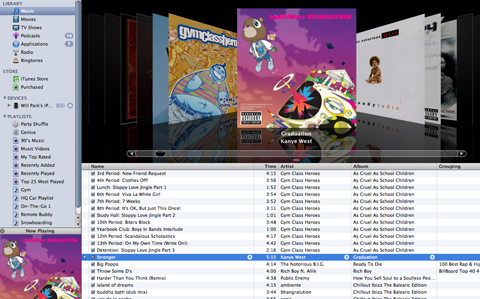
   2. Find the song you’d like to turn in to a ringtone

   Select the song you want to use as your iPhone ringtone
   
    3. Right click on the song

    * Select “Get Info”

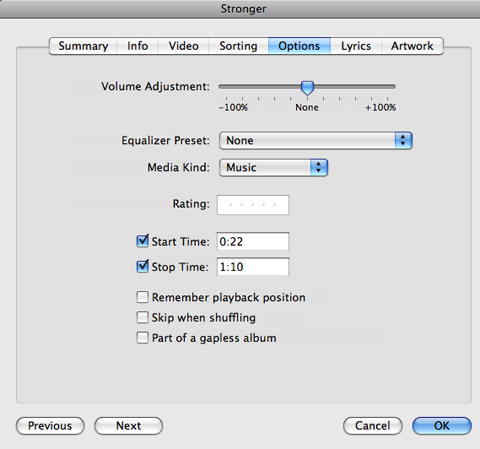
   4. Hit the “Options” tab
   5. Check both the “Start Time” and “End Time” boxes

Customize the start and end times for your ringtone clip

   6. Specify what time interval you’d like to use as your ringtone clip
   7. Click “OK”

    * Make sure the song you want is still highlighted

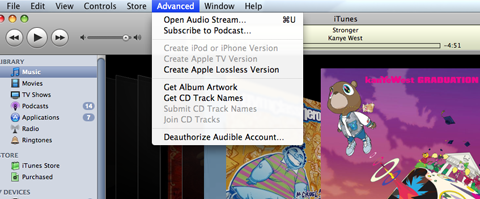
   8. Click on “Advanced” in your menu bar
   9. Select “Create AAC Version” or “Create Apple Lossless Version”


You want to create a duplicate song file with the customized playing time

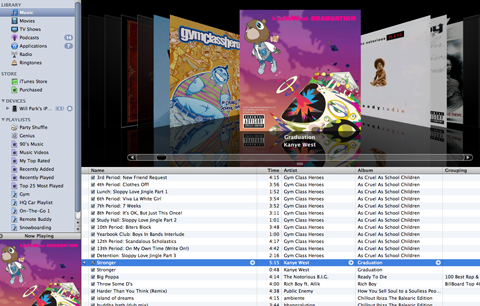
   10. A duplicate copy of your song will appear in iTunes - this new song will have the same filename but shorter “Time”

    * Go back to the original song and uncheck those “Start Time” and “End Time” boxes


See the duplicate song underneath the original song?

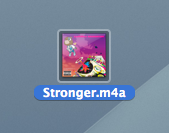
   11. Drag the duplicate song to your Desktop


Duplicate song file on Desktop

   12. Once the duplicate song is copied to your Desktop, delete the duplicate file in iTunes


Notice that the duplicate song file is gone - deleted

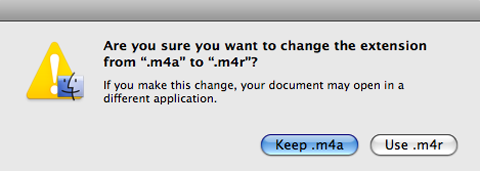
   13. On your Desktop, rename the file with the “.m4r” file extension - Use the new extension

    * This turns your song file into an iPhone ringtone file


Use the new filename extension


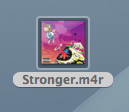
The .m4r file is now a ringtone file

  14. Your “songname.m4a” file should now be named “songname.m4r”
  15. Drag the newly renamed .m4r (songname.m4r) file back into iTunes
  16. Drag the file over the “Library” column and release when “Library” becomes highlighted
          * You have to delete the duplicate song file (Step 12) otherwise iTunes won’t import your new .m4r file
  17. You should see your new ringtone under “Ringtones” in iTunes
  18. Sync your iPhone to get jiggy with your new iPhone ringtones!

Enjoy your free iPhone ringtone library!

izvor

IP sačuvana
social share

jetra mi je propala, imam čir na crevu,
kamen je u bubregu, .ebem li mu kevu
 
Pogledaj profil WWW
 
Prijava na forum:
Ime:
Lozinka:
Zelim biti prijavljen:
Trajanje:
Registruj nalog:
Ime:
Lozinka:
Ponovi Lozinku:
E-mail:
Moderator
Svedok stvaranja istorije


tv izveštači izveštačuju izveštaj svakog dana

Zodijak
Pol Muškarac
Poruke 28218
Zastava
OS
Linux
Browser
Mozilla (Ubuntu-feisty)
mob
Apple iPhone 6
TouchType iPhone application brings landscape mode to iPhone Email

When it comes to niggling feature-quibbles, the iPhone and iPhone 3G have their fair share of disappointments. Overall, the iPhone and iPhone 3G deliver an unmatched user experience and has redefined what touchscreen smartphones should be capable of, but they still have their downfalls.

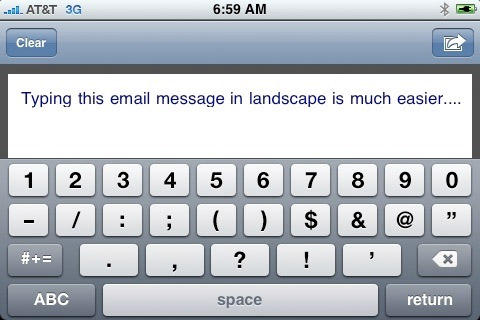
One curiously lakcing feature is the iPhone OS’s lack of landscape orientation-support in some key smartphone applications. Take the iPhone Mail application, for example. The iPhone OS doesn’t support landscape orientation when tapping out those oh-so-important emails. Landscape orientation allows for a wider on-screen QWERTY keyboard that makes it that much easier to type with those stubby fingers of yours. But, where Apple fails, the iPhone developer community prevails.


TouchType brings landscape email composition to iPhone

TouchType is a new iPhone application that allows users to compose email messages in landscape orientation. The TouchType application calls up its own text-entry window with a wider, landscape-oriented keyboard in tow.

Once your email is composed, a quick tap of the “Send” button whisks you to the iPhone’s Mail application and auto-fills your just-composed message into the email body. Simply fill out the target email address and send your email on its merry way.

TouchType will bring landscape email composition to your iPhone for $0.99 from the iTunes AppStore.

izvor
IP sačuvana
social share

jetra mi je propala, imam čir na crevu,
kamen je u bubregu, .ebem li mu kevu
 
Pogledaj profil WWW
 
Prijava na forum:
Ime:
Lozinka:
Zelim biti prijavljen:
Trajanje:
Registruj nalog:
Ime:
Lozinka:
Ponovi Lozinku:
E-mail:
Moderator
Svedok stvaranja istorije


tv izveštači izveštačuju izveštaj svakog dana

Zodijak
Pol Muškarac
Poruke 28218
Zastava
OS
Linux
Browser
Mozilla (Ubuntu-feisty)
mob
Apple iPhone 6
The guys over at MacRumors have uncovered some hidden features in the new Beta iPhone 2.2 Firmware, which has been seeded to developers.


The Features include, support for Google Street View for the Google Maps App, and also support for Japanese Emoji icons.


One of the most interesting and useful new additions, albeit a simple one is the ability to turn ‘Auto Correction’ off within the keyboard settings.

izvor
IP sačuvana
social share

jetra mi je propala, imam čir na crevu,
kamen je u bubregu, .ebem li mu kevu
 
Pogledaj profil WWW
 
Prijava na forum:
Ime:
Lozinka:
Zelim biti prijavljen:
Trajanje:
Registruj nalog:
Ime:
Lozinka:
Ponovi Lozinku:
E-mail:
Prijatelj foruma
Jet set burekdzija


A-electronic

Zodijak
Pol Muškarac
Poruke 5040
OS
Windows XP
Browser
Mozilla Firefox 3.0.3
mob
HTC desire s
Japanski smajliji  Smile
IP sačuvana
social share
Pogledaj profil Skype
 
Prijava na forum:
Ime:
Lozinka:
Zelim biti prijavljen:
Trajanje:
Registruj nalog:
Ime:
Lozinka:
Ponovi Lozinku:
E-mail:
Pocetnik

Zodijak
Pol
Poruke 16
OS
Windows XP
Browser
Mozilla Firefox 3.0.3
Gde moze da se sada kupi 8gb i po kojoj ceni ?
IP sačuvana
social share
Pogledaj profil
 
Prijava na forum:
Ime:
Lozinka:
Zelim biti prijavljen:
Trajanje:
Registruj nalog:
Ime:
Lozinka:
Ponovi Lozinku:
E-mail:
Poznata licnost


Zodijak Aquarius
Pol Muškarac
Poruke 3476
OS
Windows XP
Browser
Mozilla Firefox 3.0
mob
Apple Iphone 4
danas sam cackao malo ovaj telefon i samo mogu da kazem "u jebote sta bi ja dao da ovo imam"
IP sačuvana
social share
Pogledaj profil Skype
 
Prijava na forum:
Ime:
Lozinka:
Zelim biti prijavljen:
Trajanje:
Registruj nalog:
Ime:
Lozinka:
Ponovi Lozinku:
E-mail:
Poznata licnost


Here I am, on the road again...

Zodijak Scorpio
Pol Muškarac
Poruke 3818
OS
Windows XP
Browser
Opera 9.60
mob
HTC Touch Pro
daj nokiju Smile
IP sačuvana
social share
Pogledaj profil WWW GTalk Skype
 
Prijava na forum:
Ime:
Lozinka:
Zelim biti prijavljen:
Trajanje:
Registruj nalog:
Ime:
Lozinka:
Ponovi Lozinku:
E-mail:
Prijatelj foruma
Jet set burekdzija


A-electronic

Zodijak
Pol Muškarac
Poruke 5040
OS
Windows XP
Browser
Mozilla Firefox 3.0.3
mob
HTC desire s
Gde moze da se sada kupi 8gb i po kojoj ceni ?

Zabranjeno je reklamiranje na forumu, ali pogledaj oglase i naci ces sigurno...
IP sačuvana
social share
Pogledaj profil Skype
 
Prijava na forum:
Ime:
Lozinka:
Zelim biti prijavljen:
Trajanje:
Registruj nalog:
Ime:
Lozinka:
Ponovi Lozinku:
E-mail:
Moderator
Svedok stvaranja istorije


tv izveštači izveštačuju izveštaj svakog dana

Zodijak
Pol Muškarac
Poruke 28218
Zastava
OS
Linux
Browser
Mozilla (Ubuntu-feisty)
mob
Apple iPhone 6
WiMax iPhone? Apple may put Mobile WiMAX chipset into iPod Touch

Last week Korean Telecom reported that it has signed Memorandum of Understanding with Apple to add WiBro connectivity to iPods and Macbooks. The reason for this move might be Apple’s preparation to add Mobile Wimax chips to the iPods and Macbooks as the new wireless data standard ramps up.

As I  was browsing the news last week, one little item from Yonhap news agency in Korea caught my attention.

It said that Korea Telekom and Apple have signed the tentative deal (Memorandum of Understanding) to combine  WiBro wireless broadband technology with MacBook Laptops and iPod players.


At first I dismissed it as some minor local market development or another Apple rumor. But then it got me thinking that this actually might be something bigger.

Here’s the key part of the KT statement that caught my eye:

The memorandum of understanding signed with Apple Korea calls for cooperation in combining WiBro, a third generation-based communications technology, with Apple’s hit products such as the MacBook laptops and iPod media players, KT said in a statement.

So, exactly what kind of cooperation are we talking about here? While it might be something software/service/iTunes related, I don’t think it’s very likely. WiBro is just another wireless data transfer technology, like Bluetooth, Wi-Fi,  GPRS, EDGE and HSDPA.  And we don’t see Apple doing any specific services for them.

So that leaves us hardware. And in order for “Apple’s hit products such as the MacBook laptops and iPod media players” to work with WiBro, they will have to have a separate chipset in them.

Now, the question is why would Apple do that? I know that Korea is an interesting market, with it’s own peculiarities (like a proprietary WIPI platform required in all mobile phones) and  Apple has troubles launching it’s iPhone there.

But to take on all the associated development and production problems to get iPods and Macbooks working with a connectivity technology that’s only available in Korea? And at pretty limited numbers at that? (KT plans to have 2-350K WiBro subscribers at the end of the year). I don’t think it makes much sense for Apple.

Unless you take a closer look at what kind of technology WiBro actually is. It’s an early version 802.16e standard, which today stands for a thing called Mobile WiMax. Yes, the very thing that Sprint and hundreds of companies around the world are busy deploying right now. Many of them are not wireless carriers and have  big plans to compete with them. Including the voice services via VoIP.

But while a lot of Mobile WiMax deployments are coming around the world, the things will take time to ramp up. WiMax carriers need to build out their networks and services, get the devices for them, educate markets and make users comfortable with new offerings. Sure, in a few years we might have millions of WiMAx subscribers. But not now and not next year.

Meanwhile we already have one, and only one, market in the world with developed Mobile Wimax infrastructure, services, and hundreds of thousands and soon millions of users. Korea. And the biggest WiBro carrier there is KT.

So what better place to test and try new products for a new emerging standard? E.g. just put a Wimax chipset into an iPod touch, add a microphone and speaker, plus VoiP client software - and you’ve got all the iPhone functionality for Mobile Wimax. I’m not even talking  about MacBooks, where Intel already has hybrid Mobile Wimax/Wi-Fi chipsets on sale.

And in a few years, when the market is ready, all of these new Wimax iPods and other Apple devices  improved with real life experiences in Korea, can start taking on Mobile WiMax users worldwide.

izvor
IP sačuvana
social share

jetra mi je propala, imam čir na crevu,
kamen je u bubregu, .ebem li mu kevu
 
Pogledaj profil WWW
 
Prijava na forum:
Ime:
Lozinka:
Zelim biti prijavljen:
Trajanje:
Registruj nalog:
Ime:
Lozinka:
Ponovi Lozinku:
E-mail:
Moderator
Jet set burekdzija


Zodijak
Pol Muškarac
Poruke 5920
OS
Windows XP
Browser
Mozilla Firefox 2.0.0.13;
mob
Apple iP5
Nokia 5800 (Tube) vs. Apple iPhone 3G


Opsirnije o ovome
Link

IP sačuvana
social share
Pogledaj profil
 
Prijava na forum:
Ime:
Lozinka:
Zelim biti prijavljen:
Trajanje:
Registruj nalog:
Ime:
Lozinka:
Ponovi Lozinku:
E-mail:
Idi gore
Stranice:
1 ... 63 64 66 67 ... 221
Počni novu temu Nova anketa Odgovor Štampaj Dodaj temu u favorite Pogledajte svoje poruke u temi
nazadnapred
Prebaci se na:  
Upozorenje:ova tema je zaključana!
Samo administratori i moderatori mogu odgovoriti.
web design

Forum Info: Banneri Foruma :: Burek Toolbar :: Burek Prodavnica :: Burek Quiz :: Najcesca pitanja :: Tim Foruma :: Prijava zloupotrebe

Izvori vesti: Blic :: Wikipedia :: Mondo :: Press :: Naša mreža :: Sportska Centrala :: Glas Javnosti :: Kurir :: Mikro :: B92 Sport :: RTS :: Danas

Prijatelji foruma: Triviador :: Nova godina Beograd :: nova godina restorani :: FTW.rs :: MojaPijaca :: Pojacalo :: 011info :: Burgos :: Sudski tumač Novi Beograd

Pravne Informacije: Pravilnik Foruma :: Politika privatnosti :: Uslovi koriscenja :: O nama :: Marketing :: Kontakt :: Sitemap

All content on this website is property of "Burek.com" and, as such, they may not be used on other websites without written permission.

Copyright © 2002- "Burek.com", all rights reserved. Performance: 0.058 sec za 12 q. Powered by: SMF. © 2005, Simple Machines LLC.