Prijava na forum:
Ime:
Lozinka:
Prijavi me trajno:
Trajanje:
Registruj nalog:
Ime:
Lozinka:
Ponovi Lozinku:
E-mail:

ConQUIZtador
nazadnapred
Korisnici koji su trenutno na forumu 0 članova i 0 gostiju pregledaju ovu temu.
Idi dole
Stranice:
1 ... 33 34 36 37 ... 175
Počni novu temu Nova anketa Odgovor Štampaj Dodaj temu u favorite Pogledajte svoje poruke u temi
Tema: Nokia 5800 XpressMusic  (Pročitano 391223 puta)
Moderator
Jet set burekdzija


Nimalo ne licim na svoj avatar :))

Zodijak Scorpio
Pol Muškarac
Poruke 6660
Zastava Srbija
OS
Windows XP
Browser
Mozilla Firefox 3.0.7
mob
LG Nexus 4
pa upravo samo da sacuva ekran kolko toliko ... a i veruj mi ogromna je razlika kad padne bez i sa carapom ...

ne kazem da ova fotrola nije super ... jaka i ostalo ... al je meni ruzna do  bola Smile
IP sačuvana
social share
Vezbom do savrsenstva Smiley Smile
Pogledaj profil WWW Twitter Facebook
 
Prijava na forum:
Ime:
Lozinka:
Zelim biti prijavljen:
Trajanje:
Registruj nalog:
Ime:
Lozinka:
Ponovi Lozinku:
E-mail:
Moderator
Svedok stvaranja istorije


tv izveštači izveštačuju izveštaj svakog dana

Zodijak
Pol Muškarac
Poruke 28218
Zastava
OS
Linux
Browser
Mozilla (Ubuntu-feisty)
mob
Apple iPhone 6
ChipmunkS60 For Nokia 5800 Fast and Free Physics At Your Fingertips


Chipmunk is an open source 2D physics engine designed for 2D video games. It includes circle, convex polygon, and line segment collision primitives and multiple collision primitives can be attached to the same rigid body.

Recently, physics-based games have gained trendemous popularity. Physics-based games are easy to understand, yet hard to master and very appealing to the general public. Many games even use physics as their main gameplay element. One of the first popular examples was The Incredible Machine, followed many years later by Bridge Builder.

Chipmunk engine has been ported to almost every platform including the PSP and iPhone and thanks to the David Berger, one of the most popular open source 2D physics engines is now ported to the S60 devices as well (5th ed) .

The Chipmunk port used the Symbian S60 5th edition application "MobilePaint" as basic application for the game engine. After porting the C code from the original Chipmunk PC version it was used to integrate it into the MobilePaint application. Finally the complemental part was adding a small engine to use the draw mechanism for creating objects.

Finally the last status of the project is that you can draw rectangles and circles which get a own physical state. Furthermore you can draw lines which can be used as static collision objects. By changing the drawing color you can increase the gravity, by using the stroke tool you can decrease the gravity. A button for cleaning the screen is also available. Everything is done by using the touch interface.

Chipmunk Engine on Symbian 5th Edition


Draw immovable ground using the line tool. Circles or rectangles are movable objects that will obey the laws of physics and will automatically fall down. If you tap on the color tool, you increase the gravity. Tapping on the size tool decreases gravity; that way, you can even simulate negative gravity.

The Chipmunk engine was ported to S60 using OpenC++. As it requires a touch screen for drawing elements, it only works on S60 5th Edition devices (or later) - e.g., the Nokia 5800 XpressMusic or the Nokia N97.

Unfortunately, due to the fact that Nokia 5800 lacks the hardware graphic acceleration and the floating point support (Hardware - FPU), so any floating point maths is emulated in software and thus very slow - not good for a physics engine in fact but it runs anyway.


.:[ GAME ]:.


.:[ SOURCE CODE ]:.

Gameplay (steering):

When starting the application you will have a white space where you can draw all things. On the side you have a tool panel which can be clicked and moved whereever you want. You choose your tool and start painting. During painting the physics will not be enabled. After you have finished your stroke will be moved by physics.


You can choose following tools:

    * Clear Screen
    * Freehand
      -not implemented- this is not working atm. It just creates a dot at the end of the line. It should let you paint full closed polygons.
    * Pencil
      With the pencil tool you can create lines. This lines are static objects and will not move, but all objects will collide with this lines.
    * Circle
      You can create circles with this tool. After painting it gets a physic state.
    * Rectangle
      You can create rectangles with this tool. After painting a rectangel it will get a physic state.
    * Color
      By changing the color you can increase the gravity and you change the overall color of all objects.
    * Stroke
      By changing the stroke you can decrease the gravity until you create a negative gravity.
    * Return
      -not implemented- this is not working atm. It should remove the last item you painted.

.:[ Link to project package ]:.


izvor
IP sačuvana
social share

jetra mi je propala, imam čir na crevu,
kamen je u bubregu, .ebem li mu kevu
 
Pogledaj profil WWW
 
Prijava na forum:
Ime:
Lozinka:
Zelim biti prijavljen:
Trajanje:
Registruj nalog:
Ime:
Lozinka:
Ponovi Lozinku:
E-mail:
Moderator
Svedok stvaranja istorije


tv izveštači izveštačuju izveštaj svakog dana

Zodijak
Pol Muškarac
Poruke 28218
Zastava
OS
Linux
Browser
Mozilla (Ubuntu-feisty)
mob
Apple iPhone 6
Top 20 Freeware for the Nokia 5800 XpressMusic and S60 5th Edition

Continuing a fine and longstanding tradition, we bring you what will be a regularly updated top pick of the very best freeware for S60 5th Edition. At this moment in time, this means the Top Twenty freeware for the Nokia 5800 XpressMusic.


Until Nokia's own App Store finally gets up and running, 5800 XpressMusic owners are in the same boat as S60 phone owners for the last 5 years, in terms of having to scavenge a little in order to find everything that's of worth. Which is why, hopefully, articles like this will help out.

Note that in order to be considered for our Top 20 Freeware, an application must:

   1. be either free or at least 100% fully working in demo form, with no time restrictions
   2. be (at least partly) optimised for S60 5th Edition, the screen size on the 5800 and the use of the touch-screen

1. Google Maps

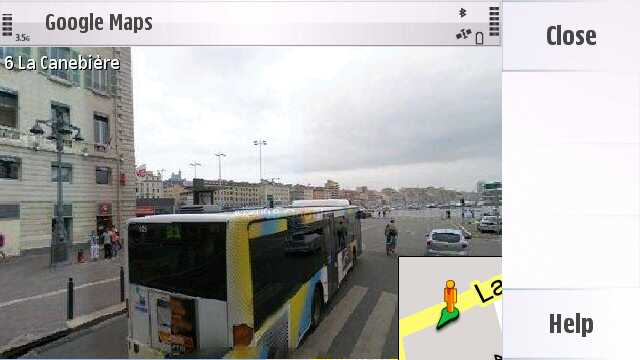
The first really huge third party S60 application to get a full touch makeover, this works superbly on the 5800 XpressMusic, in both landscape and portrait modes, and with touch-panning of maps and of the StreetView displays (in countries where this is supported) - it's almost like running Google Maps on the iPhone....(!)

Version 2.3 was the first to really work well, version 3.0 is now released and also has built-in Latitude (friend-finding) support.


Get it at m.google.com

2. PhoneTorch

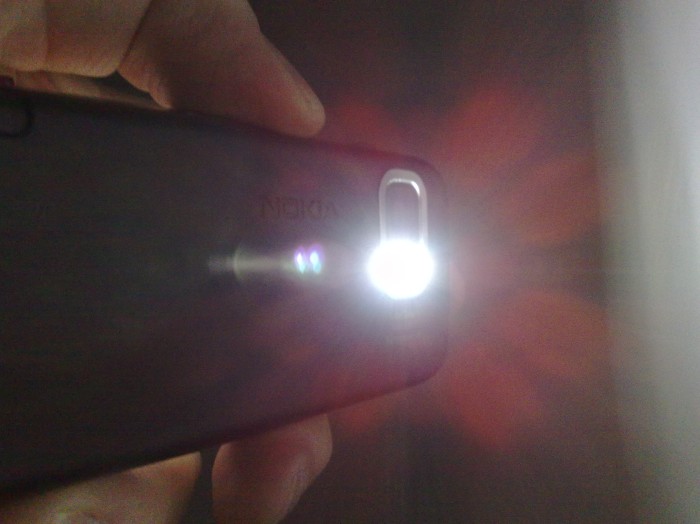
Fabulous. With the dual LED flash system able to be used during video recording, why on earth didn't Nokia let us use the LEDs as a torch when needed? Why indeed, which is why PhoneTorch is such a little God-send.


Get it from here.

3. Sports Tracker

Essentially an in-house project of Nokia's, Sports Tracker is a fabulous utility for logging exercise sessions in which you err.... actually go somewhere (other than the gym!) Workouts have full GPS stats available and you can even sync these sessions to an online server for sharing with others. There's photo support too, should you snap away while out jogging/cycling/hiking. What I especially like about Sports Tracker is the way it's regularly updated, with a dedicated update check built into the opening menu.


The ultimate GPS utility? Get it from here. [Apologies for the misleading Download! reference, I could have sworn it was in there, but it's not now visible in my Download! catalog either!]

4. Opera Mini

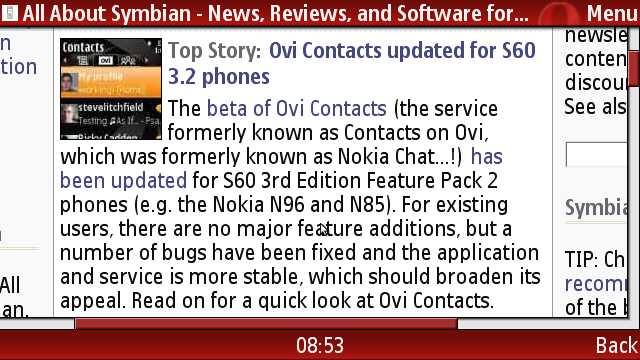
Why on earth would you want another web browser? You have S60 Web, after all? Moreover, why would you want a mouldy, ol' Java app? Because it's faster, slicker and more frugal than Web, that's why. Once you get past the initial Java hand-holding 'Do you want to go online?' questions, and leaving aside the klunky Java way text entry is approached, Opera Mini, quite simply, rocks. Backed up by special proxy servers, even huge web pages like BoingBoing can be opened in just a few seconds and browsed around with full touch-panning. If you find S60 Web too slow for tradition text-based pages then Opera Mini is a definite candidate, especially if you're not on a flat rate data plan.


Get it from mini.opera.com

5. Quickoffice

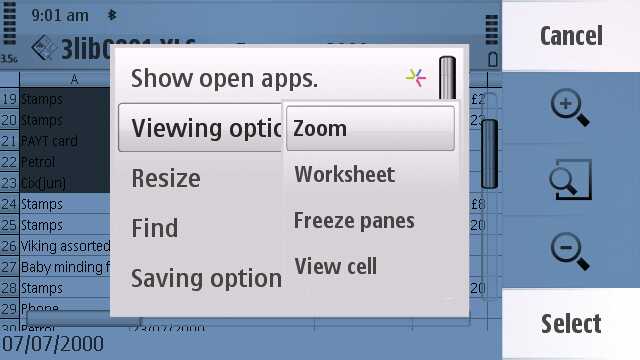
It may seem a little odd to see Quickoffice in a list of freeware and, it's true, I'm cheating slightly. But by default, Quickoffice's document viewers aren't in the 5800 XpressMusic's ROM. Instead, they're a free addition, giving you Word, Excel and Powerpoint viewing with full touchscreen support. The software's not really mature or optimised yet and I understand that the 'editing' upgrade is also not out yet, but hey, it's a damn good start and a must-download item for new 5800 owners.


You can grab the Quickoffice file viewer from Download! on your device.

6. AccuWeather

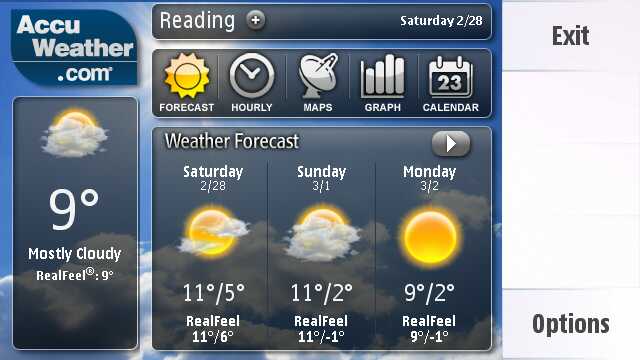
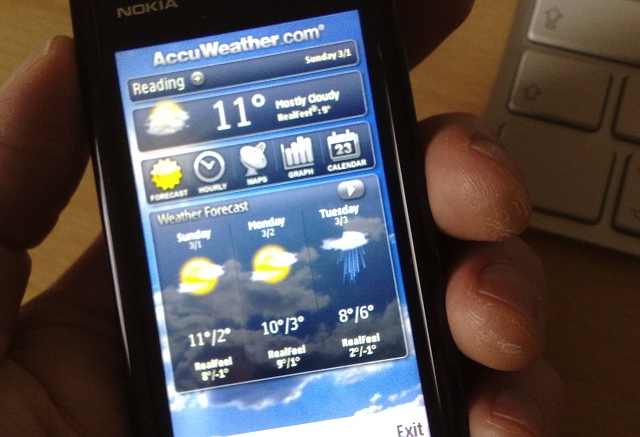
One of S60's best kept secrets, AccuWeather was always a useful little widget to have installed. With the advent of S60 5th Edition and touch control, it has been dramatically improved, now with hourly and daily forecasts, weather charts, maps, and even GPS integration, to query the exact forecast for your current location - and all for free, quite amazingly. Admittedly, it takes a good ten seconds or so to retrieve the necessary weather data over the Internet, but in this case it's well worth the wait (and anyway, with your multitasking smartphone you can just switch away to something else and come back shortly, can't you?)


Run, don't walk to the 'Widgets' section in the 'Applications' panel in your 5800's Download! application - AccuWeather should be in there!

7. Paint Pad

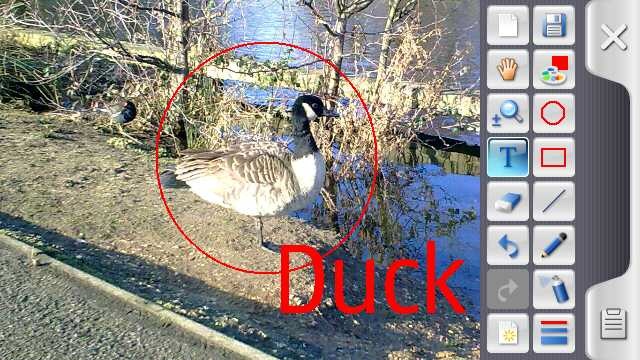
A rewritten version (allegedly) of a Forum Nokia source example, Paint Pad does a good job of standing on its own two feet, with proper load/save/background/send options, plus many more painting tools. It's the paint utility that Nokia forgot to add!


Get it from here.

8. Files on Ovi

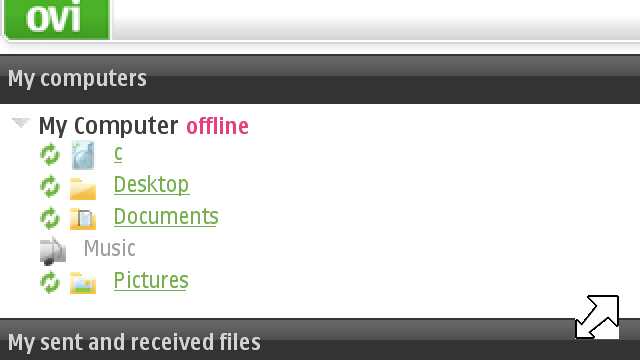
A terrific way to keep your important desktop folders automatically backed up and to have remote access to your master documents through the phone, Files on Ovi is fully compatible with the 5800 XpressMusic and S60 5th Edition - its just that Nokia doesn't make it easy... See below the pic.


Although you can simply access your 'Files on Ovi' through the mobile web site, it's tedious having to keep signing in, which makes the Files on Ovi widget so important, since it handles this for you. In order to get the widget, either sign in to the mobile site (and yes there really are half a dozen 'secure' warning dialogs to step through) and then look at the bottom of the home page - OR - type in files.ovi.com/wrt/fl/downloadw into Web and grab the widget directly.

9. Wireless keyboard

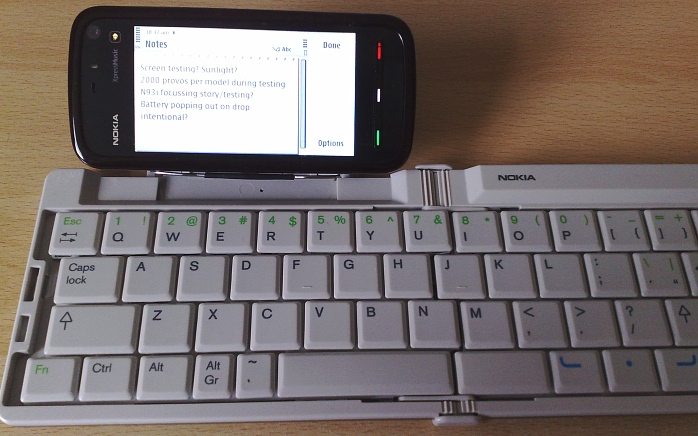
Although this hasn't been fully updated officially yet for S60 5th Edition and thus shouldn't qualify for this list as not being optimised, I couldn't resist adding the necessary install for driving a Bluetooth wireless keyboard. With this onboard, you can treat your S60 full-screen touch phone as a mini-laptop and the solution works rather well.


Use this install file, the version for S60 3rd Edition FP1 phones, until such time as Nokia get round to doing a formal S60 5th Edition release.

10. PhotoFlow Image Album

Perhaps less of a fully featured application than a technology demo, PhotoFlow still impresses for the speed and smoothness of its photo zooming. If you're sitting next to an Apple iPhone user and if you're a bit embarrassed by the slow speed of the photo browsing and zooming experience in the standard S60 Gallery application, then start this utility up instead.

It does take a few seconds at the start to cache everything, but once PhotoFlow is up and running, double-tap a photo to bring it up full screen and then double tap again to zoom right in smoothly. Very slick.


You'll find PhotoFlow Image Album in the 'Applications' section in Download!


11. France 24 Mobile

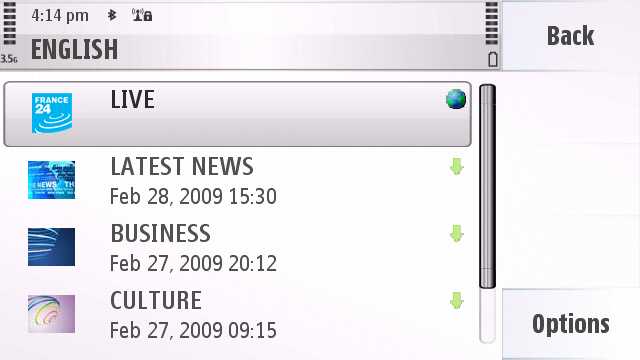
Full credit to France 24, the TV/media company, for putting out their content for free on all mobile platforms. And no, don't worry, you don't have to speak French. There's general news, business, culture and weather content here, in pre-edited (but regularly updated) 10 minute segments, all in either French, English or Arabic, plus a genuinely live stream onto the appropriate language France TV channel.

Video quality's not the best, certainly not up near that of the BBC's iPlayer, but then this is aimed at up to date news and information and it's the content that's as important as the presentation.


You can get France 24 for the 5800 by going to m.france24.mobiclip.com in Web on the device.

12. BBC iPlayer

For UK residents only, of course, and almost certainly only really practical while in Wi-Fi range, this presents the best of the BBC's TV output in very high quality, in streaming form. There are hundreds of programmes on offer, mostly from the last few weeks, plus a number of radio programmes as well, better for listening on the move since the bandwidth requirements are somewhat lower.

Never mind the version you get offered in Download!, head straight over, in Web on the device, to www.bbc.co.uk/mobile/iplayer/iplayer.wgz and install that version of the widget instead - it runs independently of Web and so is a lot less confusing in overall operation.

[Interestingly, the BBC were allowing the widget to 'Download' programmes onto the 5800 for a while, but they've now stopped this, either because of licensing restrictions or because new users were getting confused by the two-stage download/play system.]

13. JoikuSpot Light

Perhaps a pinnacle of modern software engineering, JoikuSpot turns your S60 phone and its data connection into a mobile Wi-Fi hotspot for other devices (of yours) to hook into. The premium version has loads more functions and security, but for cheap, cheerful and ad-hoc use, the free 'Light' version does very well, letting you surf away on your laptop, for example, using (in this case) the Nokia 5800 XpressMusic  as the hotspot. Yes, PC Suite also allows through-Internet connections, but isn't is just so cool to be making your own Wi-Fi hotspot?

Get it from Joiku's download page.

14. MDictionary

With the Nokia 5800 now sporting its own dictionary application in its firmware, complete with language options, MDictionary isn't such an essential download as it was... but it's Open Source and for that worthy reason I'm going to give it a plug here. Language pair options are currently a bit limited, but the project deserves to go further.

Get it from here.

15. Fring

The first of several 5800-optimised VoIP and chat clients, Fring scores by also including Skype integration, something which other clients omit. The guys at Fring also seem incredibly keen at getting onboard with the very latest handsets and they deserve support, if only for that.

16. Solitaire

Ostensibly a coding example from Forum Nokia, this is also a very playable little finger-optimised solitaire card game.

Get it from here. Once unzipped, you need the .SIS file in the /sis folder.

17. Qik

This well known live video capture utility is also now available for the Nokia 5800 XpressMusic. It'll be limited in quality due to the small size of the 5800's camera unit, but it should work better in future on the Nokia N97 and other compatible devices.

You'll find Qik in Download!

18. Mobbler

This is a Last.fm radio player and 'scrobbler' for S60 smartphones. It allows you to listen to your Last.fm radio stations and to scrobble (share) tracks played using the S60 Music Player.

Get it from here.

19. Y-Browser

This is the classic third party file manager for S60, reworked a little for touch on the large screened 5800. It's not technically fully optimised yet for S60 5th Edition and touch, but it's damn close.... try it for yourself here and don't forget to stock up on all the handy plug-ins....

20. ScreenSnap

And I just couldn't end this round-up, even the 'best of the rest' without at least giving a nod of the hat to ScreenSnap - it's written for S60 3rd Edition and doesn't work fully on the 5800, but it's still the only tool that will take screenshots, as used in this article, on S60 5th Edition. Tip: start it in landscape mode if you want to take landscape screenshots etc.

izvor
« Poslednja izmena: 17. Mar 2009, 10:57:58 od thefukara »
IP sačuvana
social share

jetra mi je propala, imam čir na crevu,
kamen je u bubregu, .ebem li mu kevu
 
Pogledaj profil WWW
 
Prijava na forum:
Ime:
Lozinka:
Zelim biti prijavljen:
Trajanje:
Registruj nalog:
Ime:
Lozinka:
Ponovi Lozinku:
E-mail:
Prijatelj foruma
Poznata licnost


sta reci

Zodijak Aries
Pol Muškarac
Poruke 3045
OS
Windows XP
Browser
Mozilla Firefox 3.0.7
mob
HTC wildfire
Evo posle 15 dana koriscenja mogu da kazem da je telefon vrh vrhova
IP sačuvana
social share
Pogledaj profil
 
Prijava na forum:
Ime:
Lozinka:
Zelim biti prijavljen:
Trajanje:
Registruj nalog:
Ime:
Lozinka:
Ponovi Lozinku:
E-mail:
Hronicar svakodnevice


Zodijak
Pol Muškarac
Poruke 597
Zastava danska
OS
Windows Vista
Browser
Internet Explorer 7.0
mob
Samsung galaxy s6 edge
Slazem se u potpunosti, za klasu u kojoj se nalazi (znaci nije luksuzna) ovaj telefon zasluzuje i vise nego pohvale definitivno zavredjuje paznju kakav li ce biti n97 mogu samo da zamislim kad su ovo tako dobro odradili ....
IP sačuvana
social share
Pogledaj profil WWW
 
Prijava na forum:
Ime:
Lozinka:
Zelim biti prijavljen:
Trajanje:
Registruj nalog:
Ime:
Lozinka:
Ponovi Lozinku:
E-mail:
Prijatelj foruma
Poznata licnost


sta reci

Zodijak Aries
Pol Muškarac
Poruke 3045
OS
Windows XP
Browser
Mozilla Firefox 3.0.7
mob
HTC wildfire
Evo posle ovoliko koriscenja nijedan jedini problem nijedan bag nijedna blokada uz sve moje mucenje kao da ima u symbianu nesto za oslobadjanje ram memorije sam je oslobadja brz extra ma posle 6 ili 7 godina koriscenja symbiana jos od 7650 to datira ovaj je ubica
« Poslednja izmena: 26. Mar 2009, 20:25:07 od djole33 »
IP sačuvana
social share
Pogledaj profil
 
Prijava na forum:
Ime:
Lozinka:
Zelim biti prijavljen:
Trajanje:
Registruj nalog:
Ime:
Lozinka:
Ponovi Lozinku:
E-mail:
Moderator
Svedok stvaranja istorije


Zodijak Aries
Pol Muškarac
Poruke 20016
Zastava Novi Beograd
OS
Windows Vista
Browser
Mozilla Firefox 3.0.7
mob
Apple iPhone
Kako drzi baterija?
IP sačuvana
social share
Preporuka za clanove: Srpski pravopis 

Pogledaj profil
 
Prijava na forum:
Ime:
Lozinka:
Zelim biti prijavljen:
Trajanje:
Registruj nalog:
Ime:
Lozinka:
Ponovi Lozinku:
E-mail:
Ucesnik diskusija


Oh my god, they killed Kenny!You bastards!!!!

Zodijak
Pol Muškarac
Poruke 182
OS
Windows NT 4.0
Browser
Mozilla Firefox 3.0.7
mob
HTC Hero + 8gb
Zavisi kako ga koristiš. Sa nekih 15 minuta priče, 1 sat opere mini, 3 sata slušanja muzike, oko 50 poruka, 15-tak fotki, instaliranja nekoliko novih stvarčica i video klipa od 2 minuta, baterija traje oko 2 dana.

Uz prosečno korišćenje može da izdrži 3-4 dana (ali pošto ga ja stalno koristim ne može da mi pregura više od 2-3 dana.)  Smile
IP sačuvana
social share
Smile
Pogledaj profil
 
Prijava na forum:
Ime:
Lozinka:
Zelim biti prijavljen:
Trajanje:
Registruj nalog:
Ime:
Lozinka:
Ponovi Lozinku:
E-mail:
Prijatelj foruma
Poznata licnost


sta reci

Zodijak Aries
Pol Muškarac
Poruke 3045
OS
Windows XP
Browser
Mozilla Firefox 3.0.7
mob
HTC wildfire
Kako drzi baterija?
Meni drzi izmedju 60 i 70 sati uz korektno koriscenje
IP sačuvana
social share
Pogledaj profil
 
Prijava na forum:
Ime:
Lozinka:
Zelim biti prijavljen:
Trajanje:
Registruj nalog:
Ime:
Lozinka:
Ponovi Lozinku:
E-mail:
Svakodnevni prolaznik


;-)

Zodijak Virgo
Pol Muškarac
Poruke 474
OS
Windows Vista
Browser
Mozilla Firefox 3.0.7
mob
SonyEricsson Xperia ARC
2 dana uvek, koristio ga vise ili manje...
IP sačuvana
social share
Pogledaj profil
 
Prijava na forum:
Ime:
Lozinka:
Zelim biti prijavljen:
Trajanje:
Registruj nalog:
Ime:
Lozinka:
Ponovi Lozinku:
E-mail:
Idi gore
Stranice:
1 ... 33 34 36 37 ... 175
Počni novu temu Nova anketa Odgovor Štampaj Dodaj temu u favorite Pogledajte svoje poruke u temi
nazadnapred
Prebaci se na:  

Poslednji odgovor u temi napisan je pre više od 6 meseci.  

Temu ne bi trebalo "iskopavati" osim u slučaju da imate nešto važno da dodate. Ako ipak želite napisati komentar, kliknite na dugme "Odgovori" u meniju iznad ove poruke. Postoje teme kod kojih su odgovori dobrodošli bez obzira na to koliko je vremena od prošlog prošlo. Npr. teme o određenom piscu, knjizi, muzičaru, glumcu i sl. Nemojte da vas ovaj spisak ograničava, ali nemojte ni pisati na teme koje su završena priča.

web design

Forum Info: Banneri Foruma :: Burek Toolbar :: Burek Prodavnica :: Burek Quiz :: Najcesca pitanja :: Tim Foruma :: Prijava zloupotrebe

Izvori vesti: Blic :: Wikipedia :: Mondo :: Press :: Naša mreža :: Sportska Centrala :: Glas Javnosti :: Kurir :: Mikro :: B92 Sport :: RTS :: Danas

Prijatelji foruma: Triviador :: Nova godina Beograd :: nova godina restorani :: FTW.rs :: MojaPijaca :: Pojacalo :: 011info :: Burgos :: Sudski tumač Novi Beograd
Pravne Informacije: Pravilnik Foruma :: Politika privatnosti :: Uslovi koriscenja :: O nama :: Marketing :: Kontakt :: Sitemap

All content on this website is property of "Burek.com" and, as such, they may not be used on other websites without written permission.

Copyright © 2002- "Burek.com", all rights reserved. Performance: 0.066 sec za 13 q. Powered by: SMF. © 2005, Simple Machines LLC.